| Filename | Latest commit message | Latest commit date |
|---|---|---|
| README.md | ||

CLI Essentials w/tmux
"
tmuxis a terminal multiplexer: it enables a number of terminals to be created, accessed, and controlled from a single screen. tmux may be detached from a screen and continue running in the background, then later reattached."
- tmux man page
I data-mined my .zsh_history and found that those are the commands that I use most in tmux:
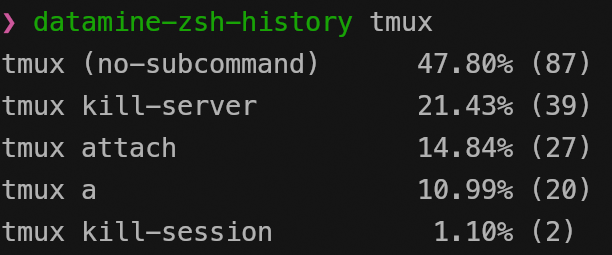
Although one could masturbate endlessly over the individual tmux commands, attach alone has 14 optional flags to be passed in, we don't do this here.
The 5 commands above are literally all I used (so far) since the actual application of tmux comes once it runs and we use the leader key.
The tmux Leader Key CTRL+b
then
a - attach to latest session
c - create new window
w - navigate windows
x - close current window
l - go to latest window
d - detach from latest session
Tmux Copy Mode
The copy mode let's you navigate and copy console output. Enter copy mode with LEADER [.
To see how to configure copy mode styling, run man tmux | grep "copy-mode-" in the terminal and then search for the results in the documentation
.tmux.conf
tmux styling
The following code enables the mouse and improves the styling
set -g mouse on
set -g default-terminal "tmux-256color"
set -ga terminal-overrides ",*:Tc"

# STATUS BAR STYLING

## 'variables' for foreground and background
set -g @fg "#141414" #F87C63 #F54927 #1C2433
set -g @bg "#bb96cb"

## Status bar
set -g status-style "bg=#{@bg},fg=#{@fg}"

## Active window
set -g window-status-current-style "bg=#{@fg},fg=#{@bg}"

## Active window (with special style, no asterisk)
set -g window-status-current-format " #I:#W "

# ...
vim-like navigation
The following code gives you a more vim-like navigation once in copy-mode
# ...

# VI MOTIONS

## Make `v` start selection (instead of Space)
bind-key -T copy-mode-vi v send -X begin-selection

## V = select entire line (linewise)
bind-key -T copy-mode-vi V send -X select-line

## Make `y` yank selection (instead of Enter) into clipboard (wayland)
bind-key -T copy-mode-vi y send -X copy-pipe-and-cancel "wl-copy"
you can reload the .tmux.conf and apply the latest changes with
tmux source-file .tmux.conf
What's next?
-
you can find my current
.tmux.confhere -
for everything else, read the docs and search through youtube